Support

How do I switch between programs?

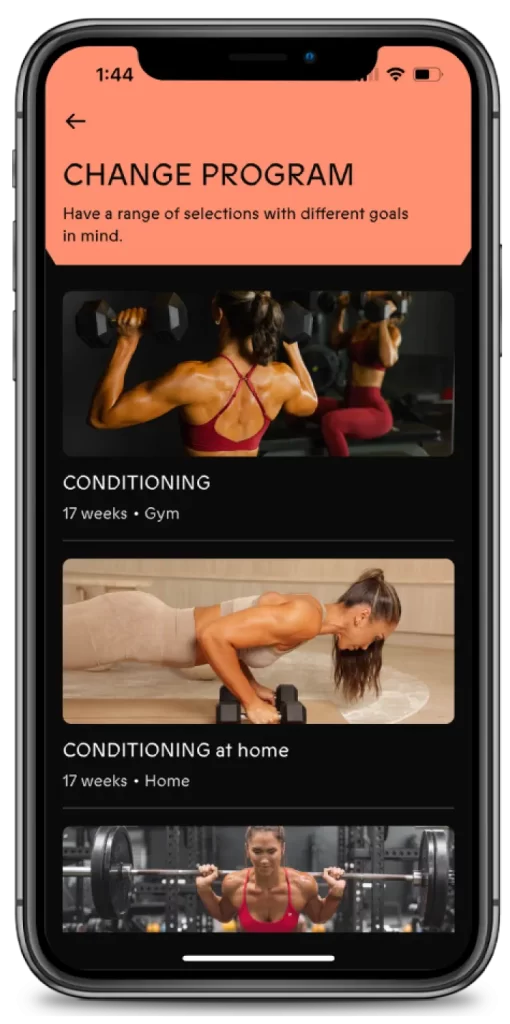
To switch between programs, head to the Workout tab in the app. Then, tap the three lines () located in the top right corner of your screen. From there, select “Switch Program“. This will take you to the programs section, where you can easily browse and switch between any of the available programs.

The Glute Project can be done with an at-home gym set-up. You’ll need a 24-inch box or step, a standard bench, an Olympic barbell, weight plates, a selection of dumbbells, booty bands, yoga mat and weight lifting hooks for heavy lifting.

If you don’t have a cable machine, we recommend using a resistance tube set as an alternative. Links to both the tube set and lifting hooks are in our link tree.

For at-home conditioning program, you’ll need some basic equipment to get started:

  • Set of dumbbells
  • Chair or Bench
  • Resistance Bands
  • Weighted plates
  • Set of Kettlebells
  • Yoga mat
  • Booty Bands
  • Skipping Rope


For the NEU Strength program, you’ll need some basic equipment to get started:

  • Set of Dumbbells
  • Set of Kettlebells
  • Resistance bands
  • Booty bands
  • A chair or bench
  • A Towel

Yes, you can complete The Glute Project from home! However, you’ll need a home gym setup with the suggested equipment to get the most out of the program.

To restart your program, follow these steps:

  1. Head to the Workout tab in the app.

  2. Then, tap the three lines () located in the top right corner of your screen.

  3. From there, select “Switch Program”.

  4. Re-select the program you were completing (e.g., “Conditioning at Home”).

  5. You’ll be given the option to “Start from Scratch”—choose this option.

  6. Re-select the same difficulty level you were completing.

  7. Choose which week you’d like to begin from.

What do I do after I’ve completed my program?

Congratulations on reaching Week 12 of our strength program! You’ve made it to the end of this 12-week journey, and we hope you’ve seen great progress in your strength and fitness.

If you’re looking to continue progressing, we have a few other programs available. For instance, our Conditioning Program runs for 24 weeks and is perfect if you’re looking to focus more on your cardiovascular fitness and overall conditioning. We also offer the Glute Project, which is a strength-based program focused solely on the lower body, specifically designed to target and build your glutes. If you’re ready to challenge yourself more, you could always repeat the NEU Strength Program! If you started at the beginner level, now’s a great time to tackle it at the intermediate level. Or, if you’ve already completed the program at the intermediate level, you can increase your weights to push your strength even further. There’s plenty of options to keep advancing, and we’re excited to see you continue crushing your goals!

Yes! You can switch between Home and gym programs at any time.
Here’s an example of how to switch between “Conditioning at Home” and “Conditioning at Gym”:

  • Head to the workout tab and tap the ☰ three lines icon in the top right corner of your screen.
  • From there, select “Switch Program”. This will take you to the programs section.
  • Select the Gym Conditioning program and choose between “Start from Scratch” or “Continue where you left off”.
  • Choose either Beginner or Intermediate, then select the week you want to start on.
  • This will take you into the gym program.


When you want to switch back to the home program:

  • Re-select the home program you were completing e.g. “Conditioning at Home”
  • Make sure to choose “Continue where you left off” so you start back where you left off and don’t lose any progress you have already made.

Yes, you certainly can! You can add sessions from another program on the days when you’re not training your lower body with The Glute Project. Be sure to check out the resource section in The Glute Project, as it includes an ebook that explains how to structure your training program across two programs and provides suggestions on how your schedule could look. To switch between programs, head to the Workout tab in the app. Then, tap the three lines () located in the top right corner of your screen. From there, select “Switch Program“.  Each time you switch between programs, make sure to select “Continue where you left off” so you don’t lose any progress in your programs. This will help you stay on track and keep your progress intact as you move between different sessions!

The NEU Strength program is 12 weeks long, divided into 3 phases of 4-week blocks. Each block is designed to progressively build your strength, mobility, and overall fitness.

WHAT MAKES OUR APP DIFFERENT